Some time ago I used a feature in KDE called “Run a command” when an event triggered. It triggered for me when a calendar event fired and used Piper TTS to read the event to me out loud. A small popup and a pling don’t work for me. I tried to get the feature back into KDE, but since the merge request isn’t going anywhere and people don’t give details how to implement it correctly I wrote Sigrun now. It is named after a Norse Valkyrie and is short for Signal Run. It is a systemd service running as a user and listening on DBus signals. Once it finds a configured one, it runs its command. The desktop doesn’t matter. Here is the rule that reads my calendar reminders aloud via kde-tts.py: [[rule]] name = "calendar-tts" [rule.event] type = "notification" [rule.filter] app_name = "kalendarac" summary = "Meeting.*" [rule.filter.hints] "x-kde-eventId" = "reminder" [rule.action] command = "/usr/local/bin/kde-tts.py" args = ["-t", "{summary}", "-d", "{body}"] crates.io/crates/sigrun codeberg.org/cryptomilk/sigrun...
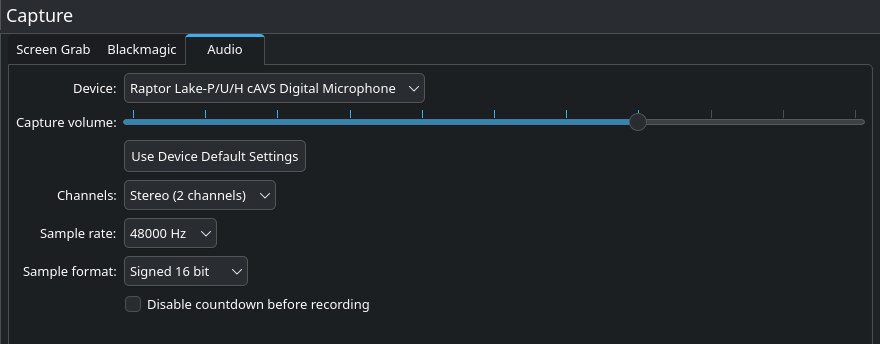
The Kdenlive team is happy to announce the first major release of 2026. This cycle focuses on stability, interface polish and usability improvements. For the first time in Kdenlive's history, this version includes features implemented by so many different contributors. Our developer community is growing, don't hesitate to join us building a free and open source video editing program that respects the users privacy and provides a tool to democratize communication. In case you missed it, check out the State of Kdenlive to learn more about the project's health and the nifty features coming soon. Monitor Mirroring This feature allows you to mirror any monitor while working in fullscreen mode. It’s especially useful when working with multiple displays or collaborating with others in the editing room, making it easier to share what you're doing without disrupting your workspace. Effects and Transitions This release improves effect and transition workflow. We improved the logic for luma files to adapt to different project profiles and automatically reload previews of downloaded lumas. We added a dedicated tab in the transitions list to browse luma files and added the ability to drag-and-drop transitions directly onto timeline clips. This release also comes with a new Euclid Eraser transition and a Heatmap effect. We also fixed issues with audio TAP effects and improved internationalization support, fixed a bug in the Video Noise Generator effect and scaling issues in the Transform effect. Animated Previews Transitions now include animated previews, making it much easier to visualize how they will look before applying them. Additionally, dropping a transition onto the timeline can now automatically adjust its duration to match the clips above and below, saving time and reducing manual tweaking. The first version of this feature was originally written by Swastik Patel, during KDE's SoK 2025. Automatic Adjustment Transitions automatically adjust to the length of the clip they are being applied to. Math Expressions Added basic math expression support in effect spinboxes. New Heatmap Effect Added a new frei0r heatmap0r effect. 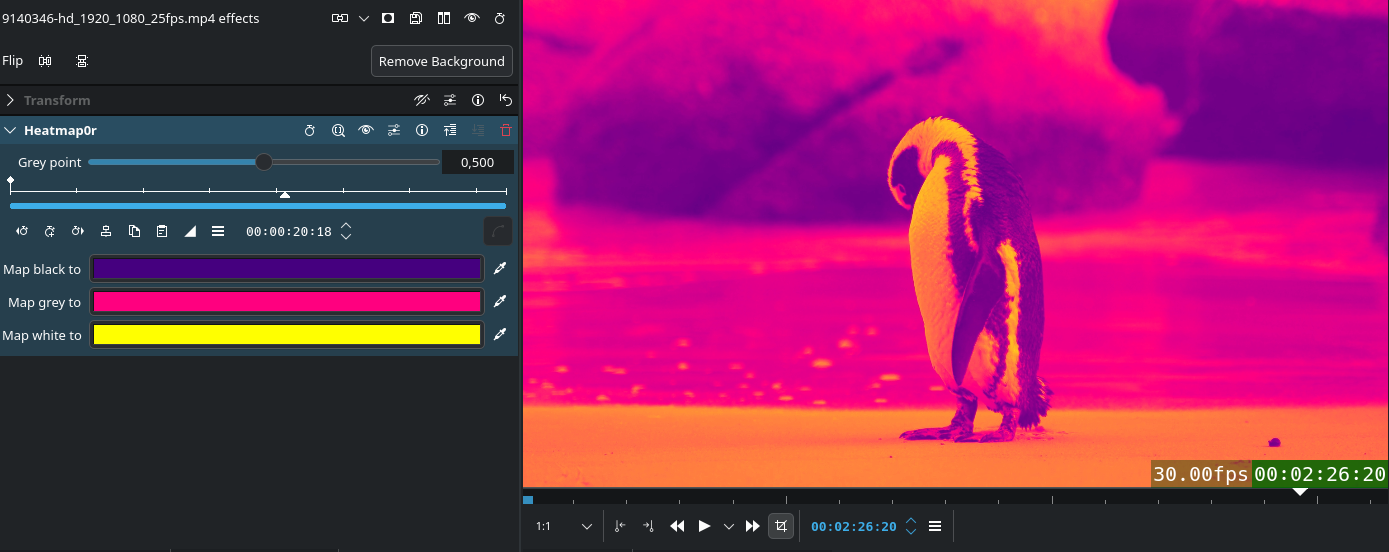 Interface and Usability Improvements Timeline This release comes with many usability and workflow improvements to the timeline, such as a Disable Timeline Effects function to timeline hamburger menu, the ability to import and add clips directly from the timeline context menu with a smart length detection function, and sequences now have audio thumbnails. Other highlights include: Continuous Panning Hold the middle mouse button and drag to continuously pan the timeline even when going outside of the screen edges. Implemented by Abdias J Moya Perez. Fixed Playhead Added the option to lock the playhead at the center of the timeline during playback, scrubbing or seeking. Implemented by Abdias J Moya Perez. Playhead/Mouse Zoom Added a button in the Status Bar to toggle between zooming to the mouse cursor position or the playhead position. Implemented by the mrfantastic. Multi-Clip Speed Changes Added the ability to change the playback speed of multiple clips at once either by directly ctrl + dragging in the timeline or by using the Clip Speed tool. Implemented by Vineet Tiwari. Audio Capture Improved support for external recording devices, now the channel count and sample rate combo boxes only display values supported by the selected hardware. Also added the option to choose the sample format (8bit, 16bit, 32bit, and float) as well as a button to use the hardware's default settings.
  Subtitles and Speech Tools This release fixes issues with cutting, moving, and saving subtitles, and solves a crash cutting subtitle clips. It also fixes a problem where searching for multiple words in the Speech Editor did not work correctly. We also improved the installation process for the Whisper and SeamlessM4T plugins and updated their requirements. Other Noteworthy Features Added Clear Undo History option in the Edit menu Added HD-ready (1366×768) resolution to project profiles Added Add to Project Bin option to Render Widget to directly add rendered file to the Project Bin Hide mouse cursor when placed over monitor in fullscreen and not moving for 2 seconds Added option to edit a video clip with external program (useful for programs like Gyroflow) Rearranged Marker menu items into groups and added a Delete All Timeline Markers action Ability to directly add clips to folders from the context menu in the Project Bin Added AMF encoding profile for Windows Give back to Kdenlive Releases are possible thanks to donations by the community. Donate now! Need help ? As usual, you will find very useful tips in our documentation website. You can also get help and exchange your ideas in our Kdenlive users Matrix chat room. Get involved Kdenlive relies on its community, your help is always welcome. You can contribute by : Helping to identify and triage bugs Contribute to translating Kdenlive in your language Promote Kdenlive in your local community For the full changelog continue reading on kdenlive.org...