When we first announced the transition to Plasma Wayland, one of Martin's slides from stated, "It's done when it's done!" That talk was 15 years ago! Nothing in software is never truly "done", but as announced previously we are finally at a point where we're ready to retire the X11 and put all our focus on the future. As of today, the Plasma X11 session you can log into has been officially removed, and we will start a mass cleanup of X11-specific code soon. When does it take effect? This change will be included in Plasma 6.8, which will be released in around five months. What's Changed? In Plasma 6.8, there will be no X11 session in the login screen. There will only be a Wayland session available to log into. In 6.8, all X11-specific code paths in Plasma for Plasma Shell, System Settings, and device configuration will be gone. What's stayed the same? XWayland support remains present. You can keep using your X11 applications, and our XWayland application support is second-to-none. If you use KDE applications on another desktop environment, this change will have no effect. KDE applications will continue to work in X11 for the foreseeable future. Plasma Login Manager will continue to be able to log you into X11 sessions of other desktop environments. What's Next? The possibilities this opens up are very exciting. Until now, on the desktop side, we've had to target the lowest common denominator or be stuck trying to maintain two conflicting code paths. It was absolutely the right choice to do a gradual transition and approach things this way, but that approach has its limits. Moving forward with a single code path going through Wayland is going to allow us to bring new performance improvements, memory optimisations, and brand new exciting features throughout Plasma. How Ready Are We? Our internal metrics within KDE show that over 95% of users of Plasma 6.6 are on Wayland, with a gradual increase every release. The metrics also show that basically no one is testing or developing Plasma on X11 anymore. The platform was already, for all intents and purposes, abandoned by KDE contributors. 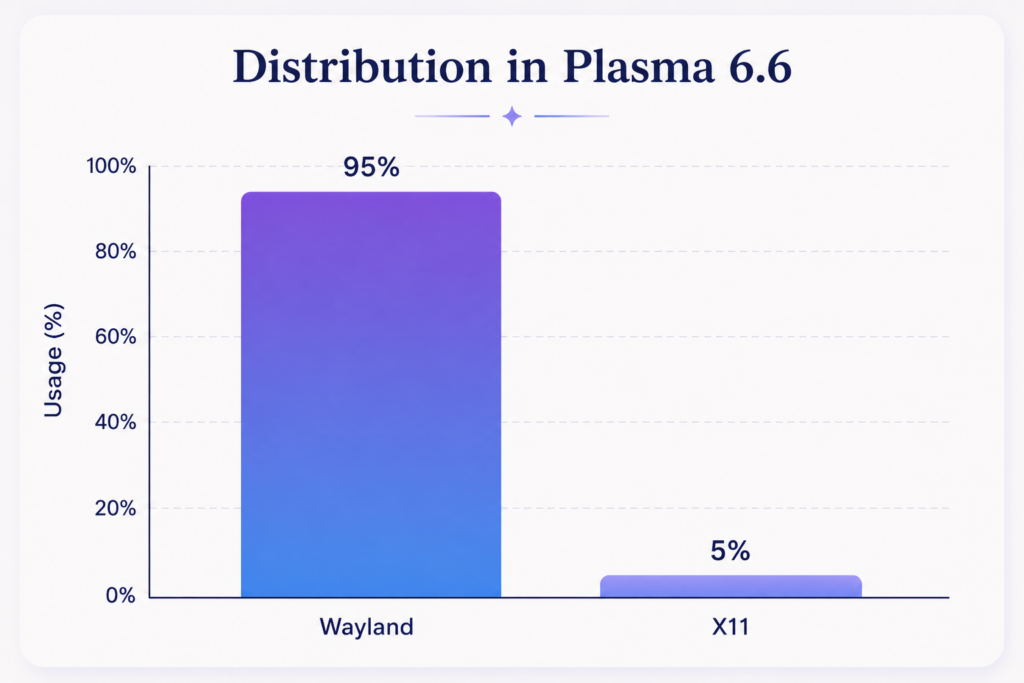 We have every reason to trust this metric data, as it is exactly in-line with what Sentry (our automatic crash reporting tool) reports for newly-encountered crashes shows. For transparency, the one caveat in all of the above is that I've deliberately always focused on people using the latest Plasma release. We do still have a sizable chunk of users on X11 still using Plasma 5.27. Including them, the total Wayland adoption rate is about 76%. But back then, Wayland wasn't the default session type, so it's hardly a surprise those users are still on X11. Things have come a massively long way in the three years since Plasma 5.27 was released. Anyone still using Plasma 5.27 — or any release older than Plasma 6.8 — won't be affected by what we do in Plasma 6.8, and nothing will be applied retroactively. Still Have Issues with Wayland on 6.7? Whilst we have had full confidence since Plasma 6.0 that our Wayland session provides the better overall experience, we are aware that things don't behave exactly the same. Not everything works the same especially in specialised areas. We are not expecting a completely seamless transition for everyone. Custom scripts, tools used and even workflows might have to change. But we are aiming to offer a transition where there is still a way to accomplish all your day-to-day tasks. Plasma 6.7 is the last release that will include an X11 session, and it's coming out in just a few days. If you still have issues that force you back to X11 we would love to hear from you. We can't promise to get everything fixed in time for 6.8, but we can promise to listen and be aware. People's remaining pain point are and will be on our radar, so please take this time to communicate them...
Hot on the heels of Krita 5.3.2, we're releasing Krita 5.3.2.1. 5.3.2 had a bug with the layer docker that was very pervasive, and could cause anything from unsynced layers to crashes to groups not behaving as they should. 5.3.2.1 fixes this. Furthermore, we also had some issues where the Windows packages weren't signed. This too should now be fixed. ⚠️ Warning We consider Krita 5.3.2.1 suitable for productive work; 6.0.2.1 is, because of the many changes from Qt5 to Qt6 more experimental. Download 5.3.2.1 Windows If you're using the portable zip files, just open the zip file in Explorer and drag the folder somewhere convenient, then double-click on the Krita icon in the folder. This will not impact an installed version of Krita, though it will share your settings and custom resources with your regular installed version of Krita. For reporting crashes, also get the debug symbols folder. ⓘ Note We are no longer making 32-bit Windows builds. 64 bits Windows Installer: krita-x64-5.3.2.1-setup.exe Portable 64 bits Windows: krita-x64-5.3.2.1.zip Debug symbols. (Unpack in the Krita installation folder) Linux Note: starting with recent releases, the minimum supported distro versions may change. ⚠️ Warning Starting with recent AppImage runtime updates, some AppImageLauncher versions may be incompatible. See AppImage runtime docs for troubleshooting. 64 bits Linux: krita-5.3.2.1-x86_64.AppImage MacOS Note: minimum supported MacOS may change between releases. MacOS disk image: krita-5.3.2.1-signed.dmg Android Krita on Android is still beta; tablets only. 64 bits Intel CPU APK 64 bits Arm CPU APK 32 bits Arm CPU APK Source code Sources are the same as 6.0.2.1 md5sum For all downloads, visit https://download.kde.org/stable/krita/5.3.2.1/ and click on "Details" to get the hashes. Key See the 6.0.2.1 key section. Download 6.0.2.1 Windows If you're using the portable zip files, just open the zip file in Explorer and drag the folder somewhere convenient, then double-click on the Krita icon in the folder. This will not impact an installed version of Krita, though it will share your settings and custom resources with your regular installed version of Krita. For reporting crashes, also get the debug symbols folder. ⓘ Note We are no longer making 32-bit Windows builds. 64 bits Windows Installer: krita-x64-6.0.2.1-setup.exe Portable 64 bits Windows: krita-x64-6.0.2.1.zip Debug symbols. (Unpack in the Krita installation folder) Linux Note: starting with recent releases, the minimum supported distro versions may change. ⚠️ Warning Starting with recent AppImage runtime updates, some AppImageLauncher versions may be incompatible. See AppImage runtime docs for troubleshooting. 64 bits Linux: krita-6.0.2.1-x86_64.AppImage MacOS Note: minimum supported MacOS may change between releases. MacOS disk image: krita-6.0.2.1-signed.dmg Android Krita 6.0.2 is not yet functional on Android, so we are not making APK's available for sideloading. Source code krita-6.0.2.1.tar.gz krita-6.0.2.1.tar.xz md5sum For all downloads, visit https://download.kde.org/stable/krita/6.0.2.1/ and click on "Details" to get the hashes. Key The Linux AppImage and the source tarballs are signed. You can retrieve the public key here. The signatures are here (filenames ending in .sig)...